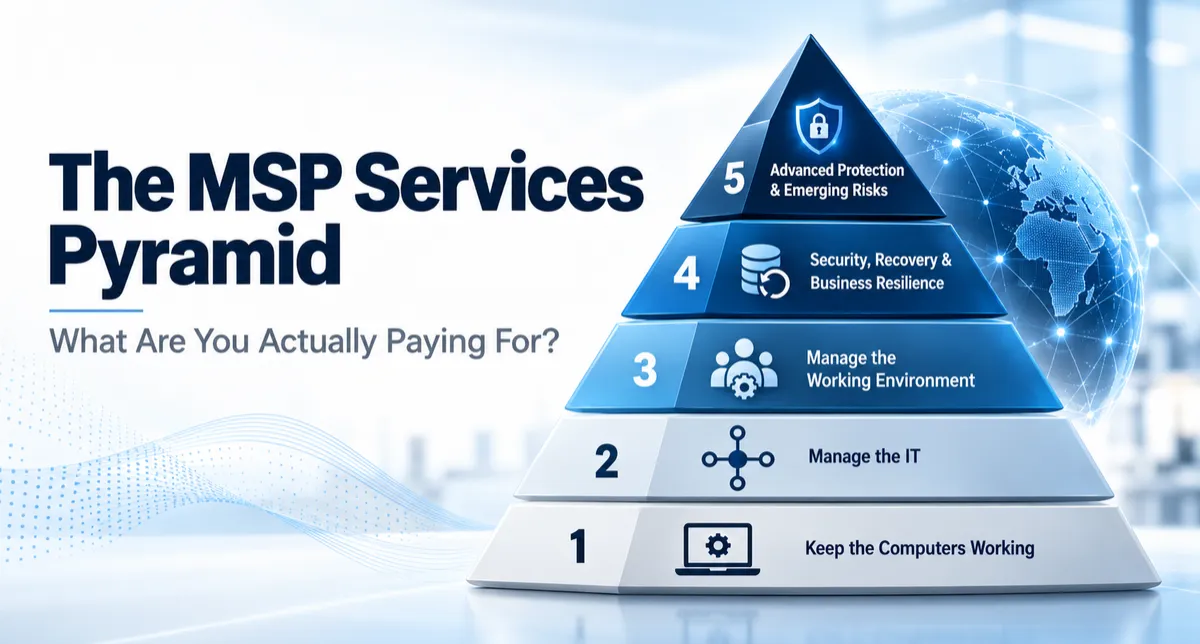
The MSP Services Pyramid: What Are You Actually Paying For?
The MSP Services Pyramid: What Are You Actually Paying For?
Search for an IT company and after a while they all start to sound the same. Managed IT. Cybersecurity. Cloud services. Monitoring. Backup. Help desk. Microsoft 365. And they all claim to have the best system for your business.
The problem is that two companies can both offer “fully managed IT” and mean completely different things. One may keep your computers updated, run antivirus and answer the phone when something breaks. Another may manage almost everything your employees use to do their jobs - where company information is stored, who can access it, how applications are managed, how systems are backed up and what happens when something fails.
Both can legitimately call themselves managed service providers. They just aren't providing the same service. A simple way to understand the difference is to picture IT services as a pyramid. The bottom contains basic services almost every business needs. As you move higher, the services become more involved, the risks being addressed become greater, and fewer businesses need everything being offered.
The goal is not to get to the top. The goal is to understand where your business is today, where it probably needs to be, and whether anything important is missing.
Level 1: Keep the Computers Working
This is the foundation. Someone helps when a computer won't start. They reset passwords, install software, fix printer problems, set up new PCs and make sure systems stay updated. There may be antivirus software. Someone probably helps with email. Some form of backup may be running. There is nothing wrong with this level. Every business needs these things. The problem comes when everything seems to be working and the business assumes that means all of its IT is being managed.
Maybe it is. Maybe only the computers are.
Level 2: Manage the IT
At the next level, the provider manages more than individual computer problems. Now they may be responsible for:
The network and Wi-Fi
The firewall
Microsoft 365
Backups
Employee accounts
Security updates
Computers and other devices
Email protection
When someone joins the company, accounts are created. When someone leaves, accounts are shut down. Backups are monitored. The firewall is maintained. Email gets better protection against spam and phishing. For many small businesses, this may be exactly the right level of service. But there is another question worth asking: Who is managing the place where your employees work? Not just the laptop. The whole environment behind it.
Level 3: Manage the Working Environment
This is where the model starts changing. Instead of every employee's computer becoming its own little island, more of the business is managed from one place. Company files have known homes. Employee access is controlled. Applications can be managed centrally. Security rules can be applied consistently rather than depending on how each individual computer happened to be configured.
Think about Mary in accounting. Her laptop dies this afternoon. What happens tomorrow morning? At many businesses, someone must find another computer, reinstall programs, locate files, rebuild settings, recover passwords and hope nothing important existed only on the old machine. In a centrally managed environment, the computer itself matters much less. Mary gets another approved computer, signs in and gets back to work. Her files are where they belong. Her access is still there. The applications she needs are available.
The computer becomes a doorway into the business instead of the place where the business lives. That's a major difference.
Level 4: Security, Recovery and Business Resilience
Now we move beyond keeping technology running and start asking what happens when something goes seriously wrong. What happens if ransomware gets in? What if an employee account is compromised? Can the business restore its systems from backup? Has anyone tested that backup? Who is watching security alerts? Can former employees still reach anything they shouldn't? At this level you start seeing:
stronger security monitoring
better recovery systems
protected backups
incident-response planning
tighter control of employee access
better visibility into suspicious activity
more structured security testing
For some businesses, these services are useful. For others, they're essential. A medical office, law firm, financial company or government contractor has a very different risk profile from a five-person landscaping company. That is why simply buying “more cybersecurity” isn't the answer. The protection should match the business.
Level 5: Advanced Protection and Emerging Risks
At the top of the pyramid are services most small businesses probably do not need today.
Large organizations, highly regulated businesses, defense contractors, financial institutions and companies holding very sensitive information may require much more.
That can include:
24/7 security operations
Advanced threat detection
Tightly controlled administrator access
Geographically separated recovery systems
Continuous compliance monitoring
Sophisticated incident response
Preparation for emerging threats
Even areas such as future changes in encryption eventually matter for organizations that need to protect sensitive information for many years. Does the average roofing company need a post-quantum cybersecurity strategy? Probably not.
Does a defense contractor protecting sensitive information for decades need to understand the issue? That's a different conversation.
That's the point of the pyramid. Where Are You? You do not need every IT service that exists. Paying for technology your business doesn't need isn't particularly smart either.
There are probably services your business does depend on. Ask yourself:
If an employee leaves today, can their access be shut down everywhere?
If a computer dies, can that employee keep working?
Do you know where your important company information is stored?
Are your backups tested, or do you simply know that someone says they're running?
Who manages your firewall?
Who manages employee access?
Who is watching for security problems?
If your business has regulatory requirements, who is responsible for the technology side of them?
Perhaps the biggest question: What does your IT provider manage? A provider doesn't have to be bad for the answer to be “not enough.” Businesses grow. Risks change. Regulations change. Technology changes. A company can simply outgrow a level of IT service that once worked perfectly well. At Net Forge Global, this is the conversation we think should come before products, packages or buzzwords: What does your business need? What do you already have? And what's missing? Because you do not need every IT service available. You do need the ones your business depends on.